Masonry Website Example
This masonry website example shows how a service homepage can organize material, repair type, access, service area, estimate process, and craft proof. The annotated mockup calls out readability, local search context, proof, and the path to request a masonry estimate. It is a concept example, not a client case study or a claim that one layout guarantees results.
Why this site works
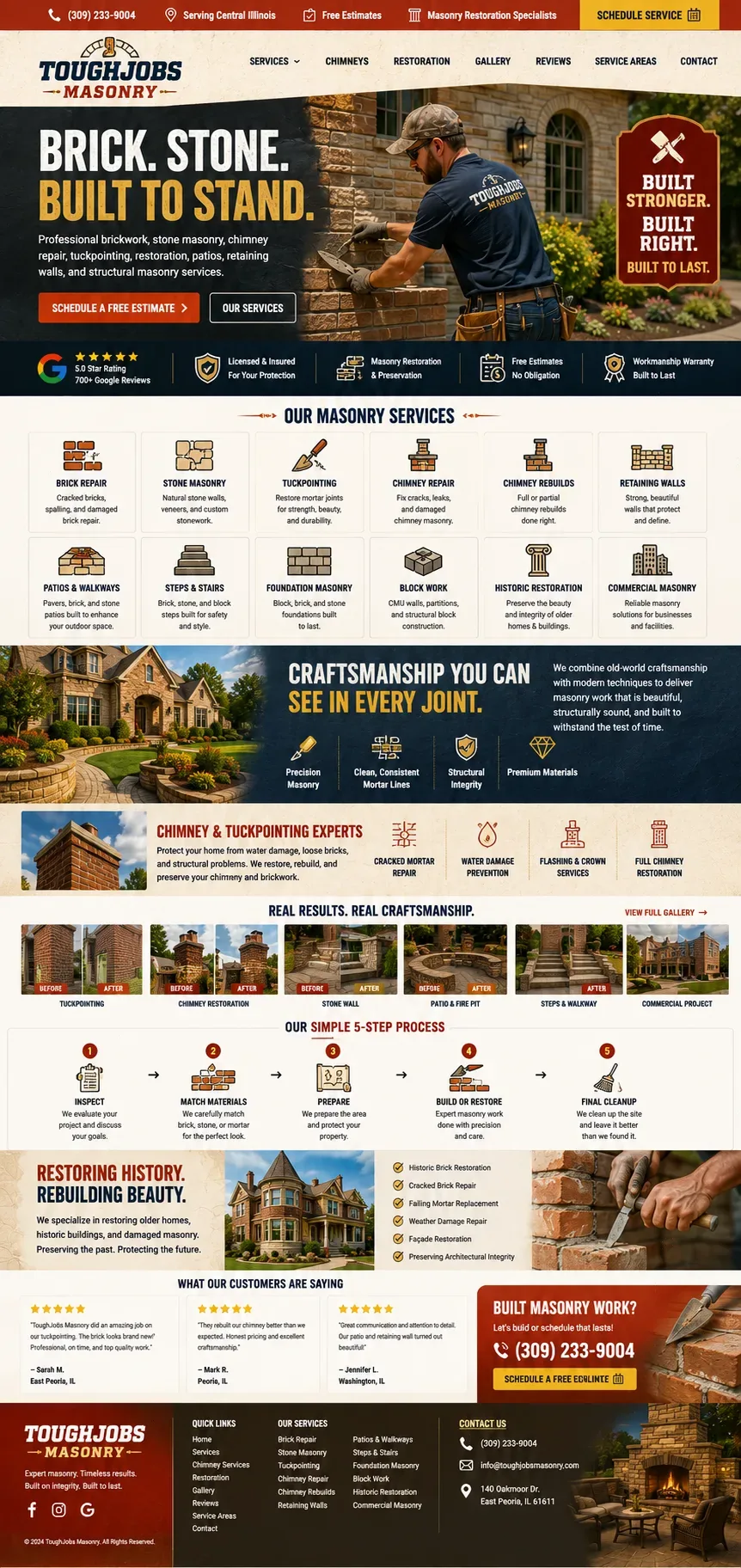
Free-estimate CTA up top — no cost, no risk to click.
Headline promises durability: brick, stone, built to stand.
Every masonry service is named so searches match the exact job.
Historic restoration section speaks directly to older-home owners.
Craftsmanship values are easy to scan at a glance.
Before/after tuckpointing shots prove the quality of the work.
The estimate button repeats again right before they leave the page.
Masonry website design: from search to action
This masonry website example is organized for the moment when a property owner compares brick, chimney, stone, or repair specialists. The layout gives the visitor a quick route through material, repair type, access, service area, estimate process, and craft proof. Its annotations explain the design decisions; they are not performance claims or a substitute for real client evidence.
Match the search moment
When a property owner compares brick, chimney, stone, or repair specialists, the visitor has a practical problem. The copy should lead with material, repair type, access, service area, estimate process, and craft proof and keep the path to request a masonry estimate visible without repeating the same button after every sentence.
Reduce uncertainty with real details
The design makes room for close-up project photos, material matching, process details, and relevant restoration experience. Those details help a customer judge fit while giving search engines clearer service context.
Design notes from the annotated homepage
- Free-estimate CTA up top — no cost, no risk to click.
- Headline promises durability: brick, stone, built to stand.
- Every masonry service is named so searches match the exact job.
- Historic restoration section speaks directly to older-home owners.
- Craftsmanship values are easy to scan at a glance.
- Before/after tuckpointing shots prove the quality of the work.
- The estimate button repeats again right before they leave the page.
Want a site like this for your trade?
We will build you a homepage engineered for calls — not just looks.
Masonry website FAQ
Each category below jumps straight to the matching answers, so you're not scrolling past questions that don't apply to you. Want the complete list instead? Open the full FAQ hub underneath.